Review Face, Frame, Height and Bodyfat, and decide whether you are ready to risk the run you have built.
Read the result instead of assuming a complete wipe
The battle panel compares Face, Frame, Height and Bodyfat individually. Winning or losing is shown after those comparisons; one large attribute does not describe the whole matchup.
At 2:50 in CHALLS’s August 29 recording, the result shows a 15% loss of earned stat progress and a 10-minute wipe-protection timer. Check the before-and-after values and protection timer on your own result screen; these amounts can change with game updates.
- Review the four comparison bars and the result of the battle.
- If the MOGGED screen appears, read each changed value and any protection timer.
- Resume collection for the attributes that actually changed.
- Before another challenge, inspect the current rules and your own stats rather than assuming a previous penalty always applies.
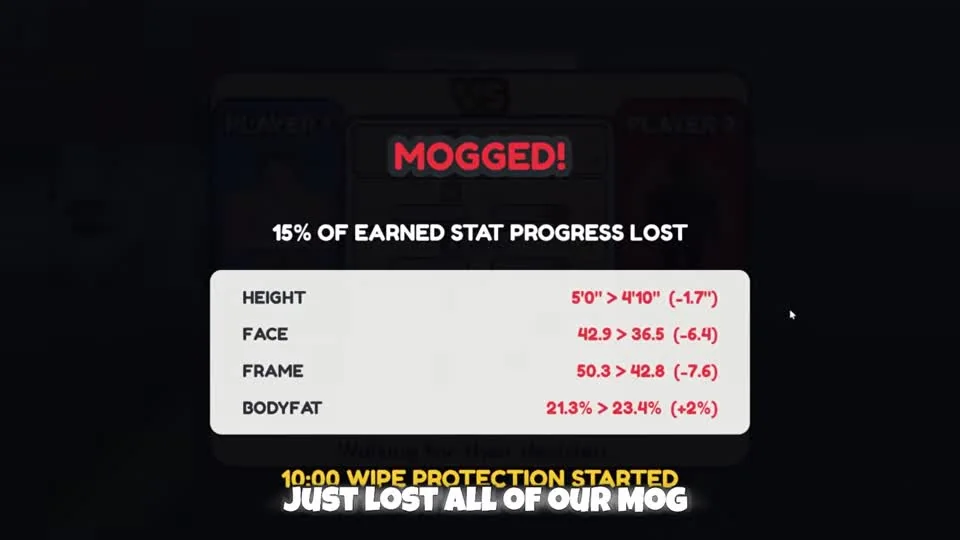
This August 29 gameplay result shows partial stat loss, despite the narrator saying everything was lost. Read the actual result on your current build.
CHALLS on YouTube · 2:50Open Manage and place captured moggers
The home-pad Manage interaction opens Captured Moggers. Cards distinguish an available Place on Pad action from Take Off Pad; these are the controls that determine what is assigned.
Auto Equip Best is visible in the recorded menu. You can use that control or assign a card yourself, then inspect the resulting pad and stored MogPoints. Owning a card alone is not the same as placing it.
- Return to your home pad and use Manage.
- In Captured Moggers, inspect the owned cards and choose Place on Pad, or use Auto Equip Best.
- Confirm the assigned card changes to Take Off Pad and the mogger is present on the pad.
- Return to the pad’s collection point to collect accumulated MogPoints.
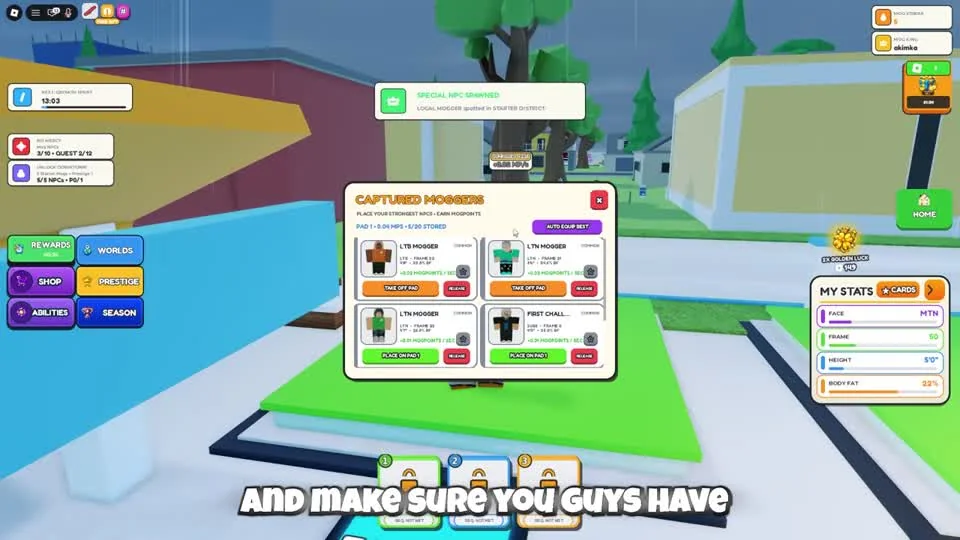
Check the card’s pad action after assignment. Place on Pad and Take Off Pad represent different states; ownership alone is not the placement step.
CHALLS on YouTube · 1:55Inspect an ability before using it in a run
Abilities opens Roll Ability. In the recording a roll produces Magnet, which appears in the available hotbar slot and is later activated during collection. The result is an example of one roll, not a guarantee of getting Magnet.
Read the roll cost and current ability description before spending. A collection ability does not prevent another player from challenging you. Keep room to return to your base even when you have a useful pickup effect.
- Check the MogPoints you have collected before opening Abilities.
- Read the roll cost and which slots are available.
- After a roll, read the obtained ability, confirm its slot and use its displayed control.
- Test the ability on a familiar collection route while watching for other players.
Questions before your next run
Does being mogged always erase every stat?
Do not assume that. The recorded result in this guide shows partial loss. Read the current result screen for exactly which stats changed and any protection timer.
Where do I place captured moggers?
Return to your home pad, open Manage and use Place on Pad in Captured Moggers. Check the assigned card and the pad afterward.
Does a roll guarantee Magnet?
No. Magnet is the result shown in the walkthrough. Read the ability you actually receive before planning around it.
Watch the walkthrough
Follow the original gameplay alongside these steps. Menus and balance can change after a video is published.
Mog Or Die Guide! (How To Prestige Fast, Auto MogPoints, Tips & Tricks) ROBLOX
CHALLS · Published 2026-08-29